Battle Royale
Top 5No games played yet
Call of Block 3.2
Call of Block is a competitive Minecraft PvP shooter featuring Battle Royale, Team Deathmatch, Free For All, Duels, experimental Zombie Survival, TacZ guns, Superb Warfare vehicles, destructible maps, Parcool movement, player statistics, and tactical match replays.
No games played yet
No games played yet
No games played yet
No games played yet
No games played yet
Main Modes
Battle Royale drops solo players and teams over Shmar to loot TacZ weapons, explosives, and Superb Warfare vehicles before the moving zone closes. Team Deathmatch and Free For All provide faster kit-based combat. Duel adds round-based fights for teams of one or two, while experimental Zombie Survival uses full-map scavenging and escalating server-controlled pressure.
Fly over Shmar, choose a drop, loot TacZ guns and Superb Warfare vehicles, use the destructible environment, and stay ahead of the moving zone. Team play, reconnect grace, configurable air-drop respawns, and an experimental Lights Out variant are supported.
BR statsChoose Team Deathmatch or Free For All, vote for a map, select a kit, prepare for five seconds, then respawn and chase the configured score target.
Fight 1v1, 1v2, 2v1, or 2v2. Choose kits between rounds, spectate a living teammate after death, and reach the configured round-win target without mid-round respawns.
Duel statsExperimental: deploy solo or in teams, loot across Shmar, use vehicles and revival, and survive escalating server-controlled hordes. The Hordes infection and Mob Control access integration remain in development.
Survival statsCheck rankings, player profiles, match history, weapons, maps, headshots, playtime, win rates, and the last completed games from the live server stats.
LeaderboardsPick the best community match time with transparent availability, preferred dates, mode interest, and a ranked winner.
Open schedulerBattle Royale Intel
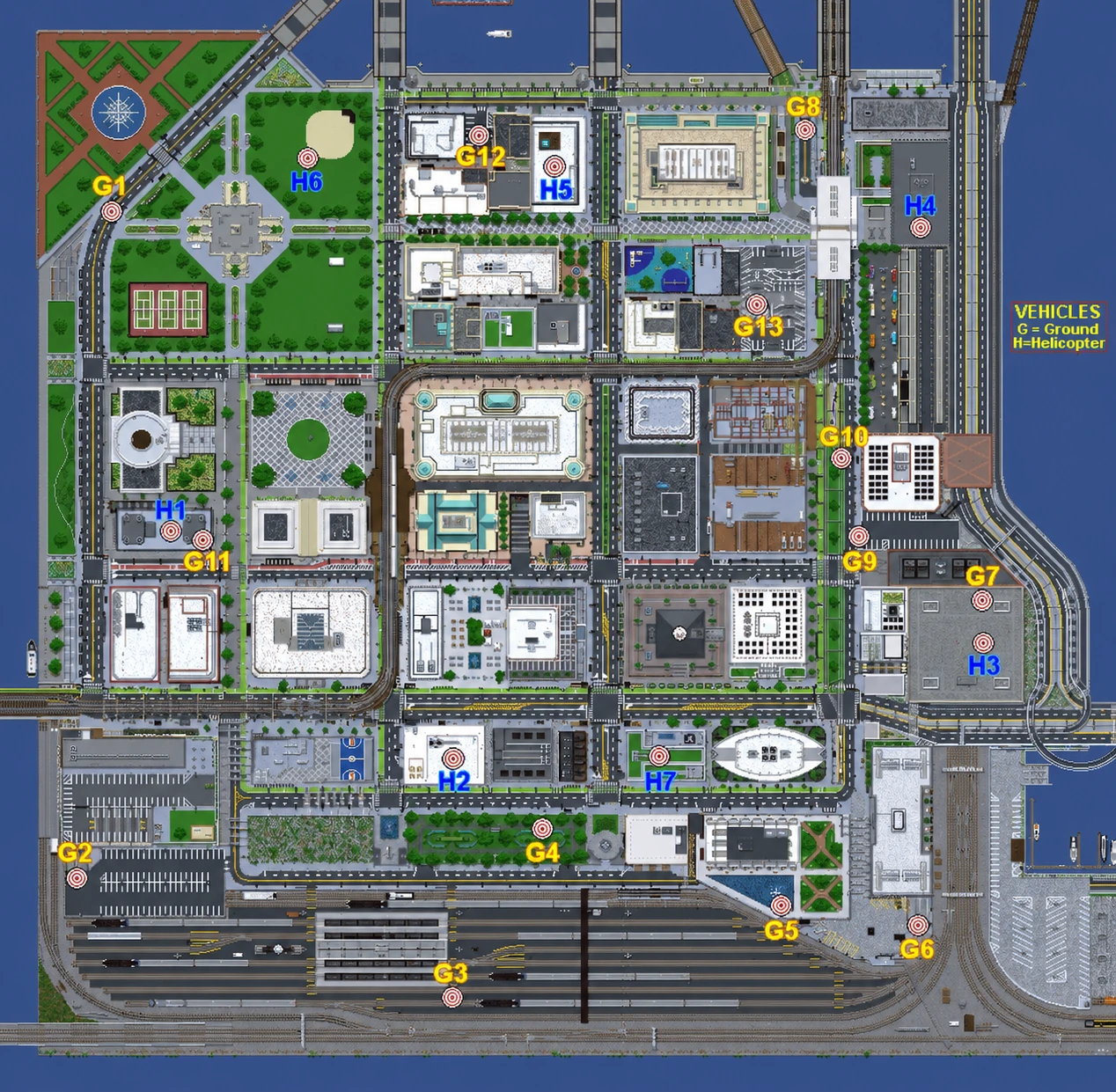
Use the marked locations when planning a drop or searching for transport. These are possible spawn points, so a vehicle is not guaranteed to appear at every marker in every match.
Spawn chance: Marked locations do not have a 100% vehicle spawn rate.
Community Playtests
Planned dates are highlighted as featured sessions, while extra community suggestions live on the calendar. Pick Available, Maybe, Unavailable, or Preferred, then choose whether you would rather test Battle Royale, Zombie Survival, TDM, FFA, Duels, or any mode.
Join The Server
Featured Videos
Short gameplay showcases covering movement, weapons, the shooting range and loadout creation.
Getting Started
Install the matching pack, join an announced server session, then use the in-game Call of Block menu to enter a mode.
Open Call of Block Menu under Minecraft Controls, or type /cob menu, then choose a player or spectator queue./cob dm queue tdm join, choose Team 1, Team 2, or random, or use /cob dm queue ffa join for Free For All./cob dm vote map <id> or /cob dm vote random.Completed rounds are published to the website for leaderboards, profiles, weapons, maps, and match history. To connect those stats to your website account, run /linkminecraft in Discord's #minecraft-verification channel and then /cob discord link <code> in Minecraft while the bot and server are online.
Questions
No. The community server is not guaranteed to run 24/7. Check Discord announcements and the Playtests page for planned sessions and confirmed dates.
Install the official Call of Block modpack through CurseForge or Modrinth. It runs on Minecraft 1.20.1 Forge. Using the launcher profile is safer than assembling the mods manually.
The server can support cracked accounts during community sessions, but the current whitelist and access instructions still apply. Check Discord before joining, and use the same required modpack.
Battle Royale uses fly-by insertion, full-map looting, vehicles, destruction, and a moving zone. Team Deathmatch and Free For All use kits and respawns. Duels supports 1v1 through 5v5 arrangements on compatible maps without mid-round respawns. Zombie Survival is a scavenging and endurance mode with solo, co-op, or opposing-team arrangements.
No login is needed to browse public stats. Discord login is required for your website account, profile customization, missions, playtest voting and notifications, and Feedback & Support tickets.
Run /linkminecraft in Discord's #minecraft-verification channel, then use the displayed /cob discord link <code> command in Minecraft before it expires. The bot and server must be online while linking. Once saved, your website profile can load the link while the bot is offline.
Stats are recorded by the server and published after completed matches. Mid-round values do not immediately replace the public profile. Wait for the match and publish process to finish, then reload the page.
Open Playtests, select a date, and submit your status and available time range. Times are displayed in your local timezone. A gray Unconfirmed date is only a possibility; the Upcoming Event appears after an administrator confirms the final date and time.
The public parts of the website can be viewed without signing in. When you choose to log in, authentication is handled directly by Discord through Discord OAuth. Call of Block does not receive or store your Discord password.
Discord provides the basic account information required to identify your profile, such as your Discord user ID, username and avatar. The website may also store your linked Minecraft identity, tracked game statistics, profile customization, XP and mission progress, playtest responses, notifications, and any support tickets or attachments you choose to submit.
Call of Block will never ask you to enter your Discord password, authentication code or account token into a website form. Only use the official website, Discord server and modpack links provided here.
Your ticket, replies, and directly uploaded screenshot or clip are available to you and authorized staff, not to other players. Do not include passwords, authentication codes, or other secrets.
GitHub Pages and browsers can cache site files for several minutes. First try a normal reload. If a new deployment is still showing an old script or image, use Ctrl+F5 once to bypass the cached copy.
Server Help
Type /cob help in-game for the current command groups. Administrators can open the protected operations reference from their account panel.
Open Call of Block MenuBind this in Minecraft Controls, or use /cob menu./cob menuOpens the main server menu for queues, teams, votes, kits, and mode panels./cob hubReturns you to hub and exits an active spectator queue./cob help <topic>Shows focused help for BR, DM, Duel, Zombie Survival, vehicles, Discord linking, statistics, or admin commands./cob leaveBegins the protected leave flow for an active match; confirm with /cob leave confirm./cob br queue joinJoins the Battle Royale player queue./cob br queue soloJoins and selects solo play./cob br queue team <id>Joins and selects an existing team; use newteam to create one./cob br queue spectateJoins the Battle Royale spectator group./cob br queue leaveLeaves either Battle Royale queue role./cob dm queue tdm joinJoins Team Deathmatch; add team 1|2|random to choose a preference./cob dm queue ffa joinJoins Free For All./cob dm queue tdm|ffa spectateJoins that mode's spectator group./cob dm queue leaveLeaves a TDM / FFA player or spectator queue./cob dm vote map <id>Votes for a map while queued; use /cob dm vote random for random./cob kitOpens the kit picker when the current mode permits it; use /cob kit <id> to select directly./cob duel queue joinJoins Duel; use team 1|2|random to choose a team preference./cob duel queue spectateJoins the Duel spectator group./cob zombie queue joinJoins the experimental Zombie Survival player queue./cob zombie queue spectateJoins the Zombie Survival spectator group./cob discord link <code>Claims the one-time code created by the Discord bot./cob leaderboardOpens the combined in-game leaderboard./cob leaderboard br|dm viewOpens a mode-specific in-game leaderboard.Player actions require an in-game player. Map voting requires a TDM / FFA queue. Kit selection depends on the active mode and preparation state. Administrator commands require permission level 2, and destructive match/statistics operations use a separate confirmation step.
Creator & Trust
Call of Block is an independent competitive Minecraft multiplayer project and server created and maintained by Lukas, also known online as TheWrongLuke.
The official Call of Block modpack required to play is distributed through CurseForge and Modrinth. Callofblock.com is the official website for server information, statistics, leaderboards, match history, tactical replays, playtests and community tools.
I originally created the website as a portfolio project, but it also became an important part of developing Call of Block as a complete community minigame. It provides live statistics, player profiles, account customization, missions, playtest scheduling, community support and other features surrounding the Minecraft server.
The project is developed independently and is still evolving through testing, player feedback and continued development.

